Subscriptions and cleanup
Two pages under Mail are for mail you did not write and rarely read: newsletters, offers, notifications and years of old archived mail. Both are in the navigation (under More in the Classic style) and look the same in every style and on a phone.
Subscriptions
Mail → Subscriptions lists every mailing list and every sender of bulk mail, one row each. Mail with a list header is grouped by its list; other mail that has an unsubscribe link is grouped by the sender's address.
Each row shows:
- how many messages arrived in the last 30 days, the last 90 days and in all;
- the share you read, and when you last read one;
- whether you ever replied in one of its conversations;
- how it unsubscribes: One-click, By email, Web page, or not at all. Checking means the newest message is still being looked at; the row is updated automatically.
In the first order, Least read first, busy subscriptions you never open are at the top. Change the order, or show only the subscriptions To review, Never read, Auto-archived, Kept or Unsubscribed. Use the search box to find a list or a sender.
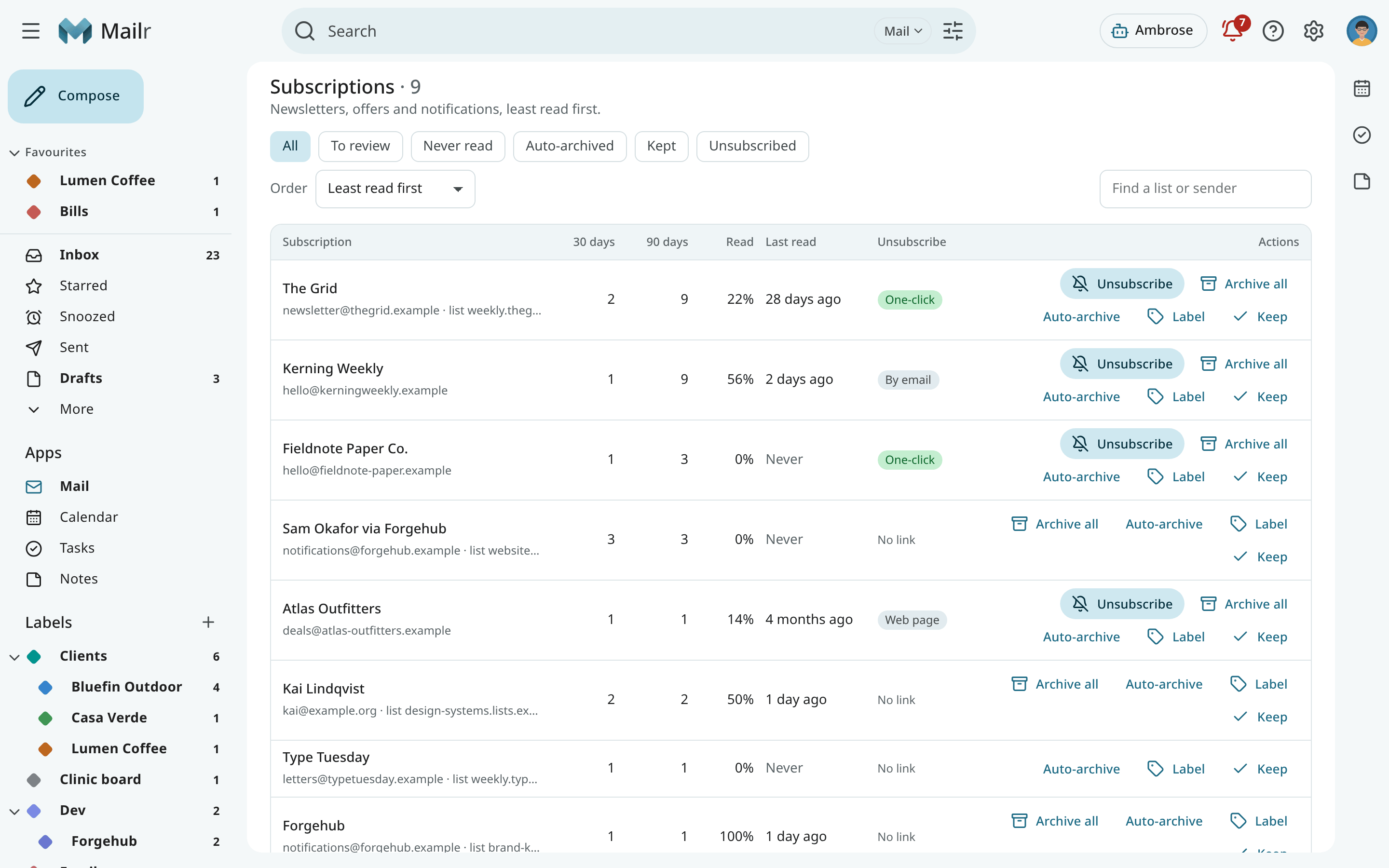
Subscription actions
- Unsubscribe. A dialog first shows what will happen. For One-click, a single unsubscribe request is sent to the list's own address; the page is never opened. For By email, a message with the subject and text "unsubscribe" is sent to the list's address, from the address that received the list, and only when that address belongs to the sender's or the list's domain. For Web page, you open the page yourself. When the administrator requires the VPN egress for remote content, a one-click request waits for it too.
- Archive all. The subscription's conversations in the Inbox are taken out of it. They are listed in a preview first, and the toast has Undo.
- Auto-archive. New mail from the subscription is kept out of the Inbox. A filter is made for this in Settings → Mail → Filters & blocking; use Stop auto-archive to remove it.
- Label. Put one of your labels on all of its conversations, with a preview and Undo.
- Keep. Mark it reviewed, so it is removed from To review. Use Review again to bring it back.
With Archive all and Label, starred and important conversations, and conversations you replied to, are left alone; the preview has switches to include them.
Clean up
On Mail → Clean up, a backlog is grouped so that it can be cleared one group at a time. Group the mail by Sender, Domain, List or Category, and choose which mail to look at:
- Mail: archived mail (not in the Inbox, Trash or Spam), the Inbox, or all mail;
- Age: any age, or older than a month up to five years;
- Uncategorised only, and Newsletters and automated mail only.
Each group shows its conversations, messages, size, unread count and dates, and how many conversations it leaves alone.
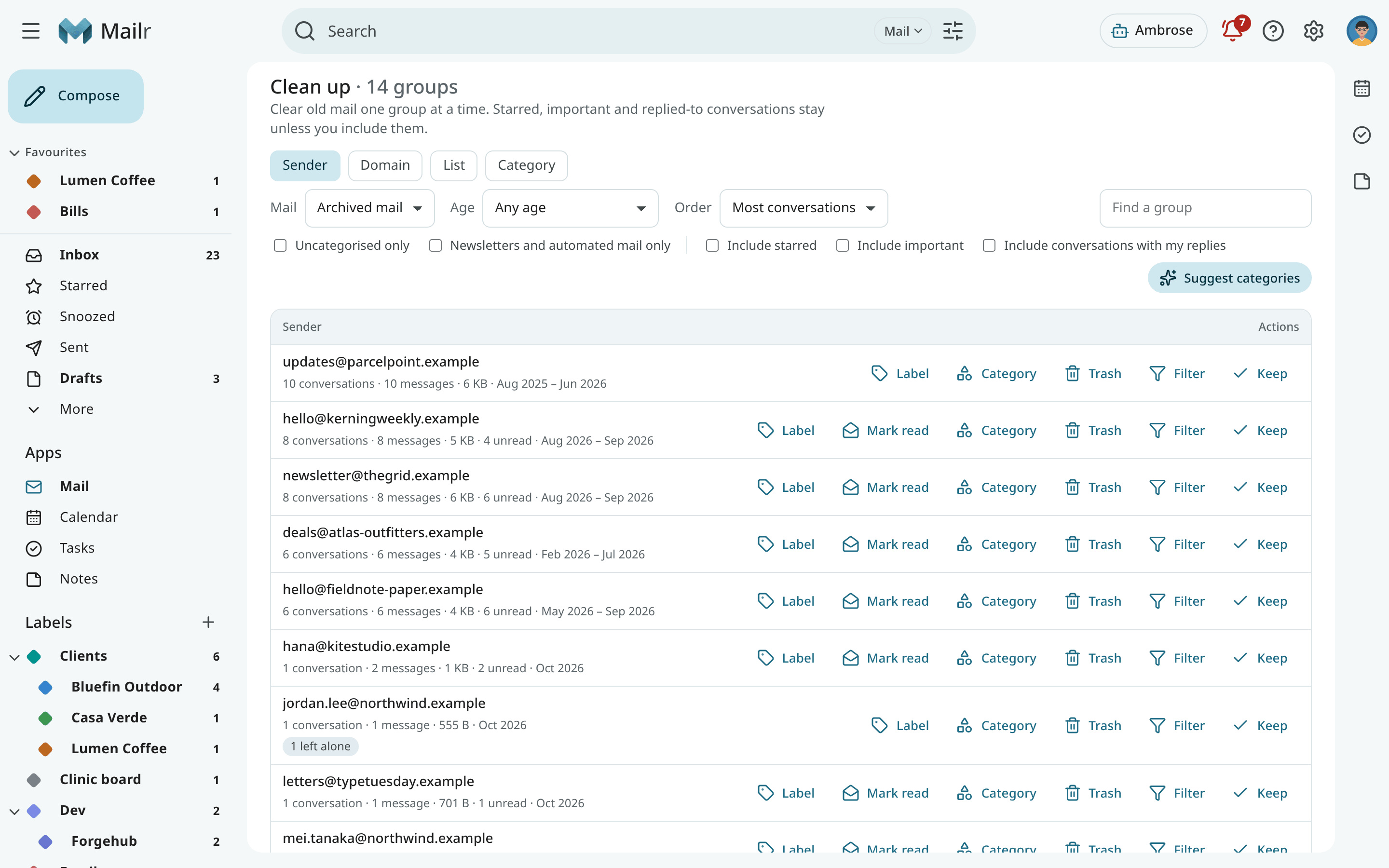
Safeguards
- Starred and important conversations, and conversations with your own replies, are never touched unless you tick Include starred, Include important or Include conversations with my replies (on the page or in the preview).
- Before every action, a preview is shown: the exact number of conversations and messages, the newest 20 of them (click one to open it), what is left alone and why, and whether the action can be undone. Nothing changes until you confirm.
- If the group changes between the preview and your click, for example because new mail arrived, the action is stopped and you are asked to look again.
- Use Trash to move conversations to Trash. Nothing is ever deleted forever from this page.
- Mail from local-only accounts follows the same rules as everywhere else: it is never sent to a hosted model.
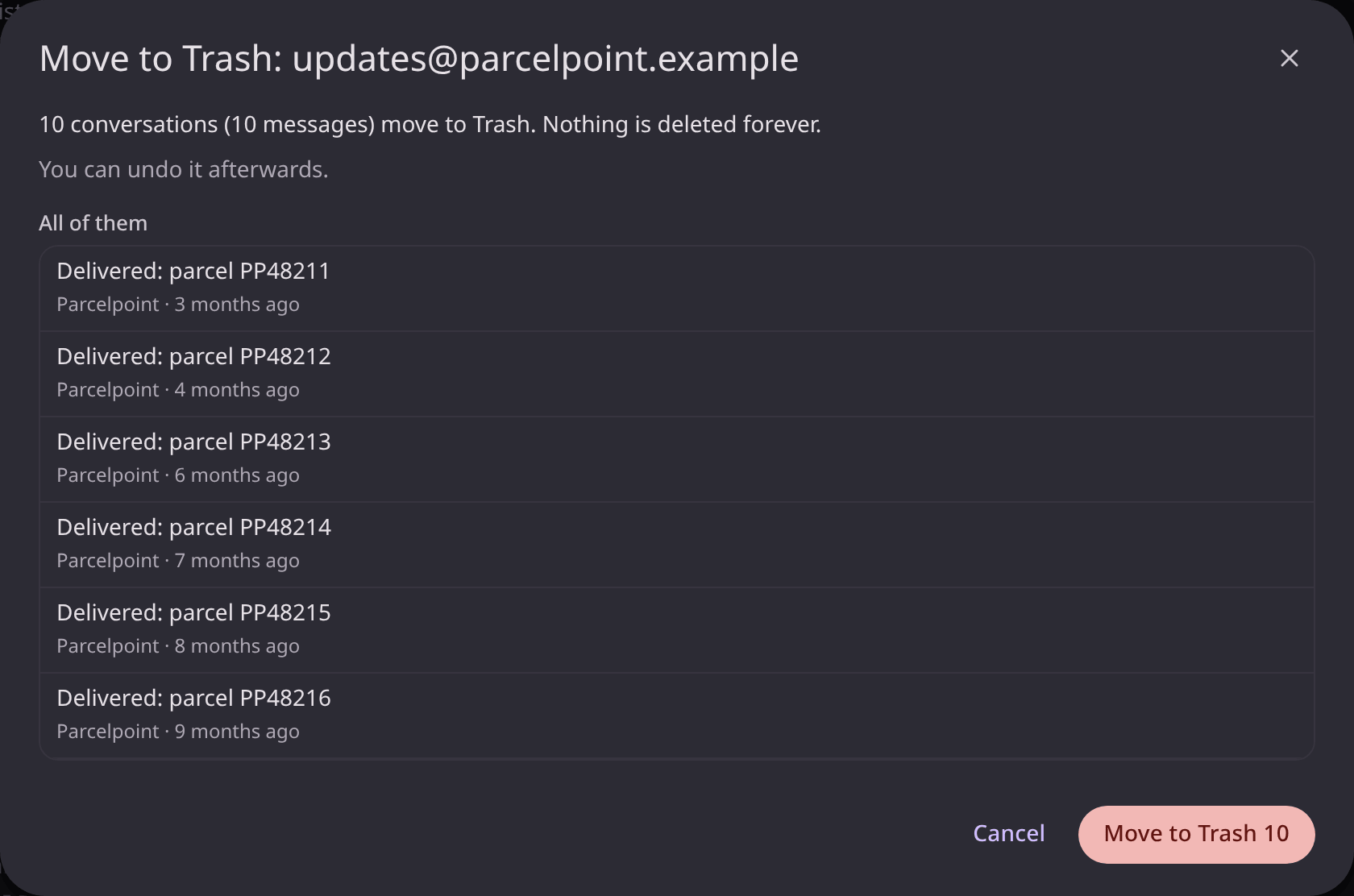
Actions on a group
| Action | Effect |
|---|---|
| Archive | Take the group's conversations out of the Inbox (shown when some are there). |
| Label | Put one of your labels on them. |
| Mark read | Mark them read. |
| Category | Move them to an inbox category, such as Promotions or Updates. |
| Trash | Move them to Trash. |
| Filter | Make a filter for the group's future mail: skip the Inbox, mark read, a label or a category. Mail you already have stays as it is. |
| Keep | Mark the group reviewed and change nothing else. |
Small groups are changed at once. Large ones are processed in the background, with a progress message. Either way the message at the end has Undo. Above 10,000 conversations there is no Undo, and the preview shows this.
Category suggestions
For uncategorised mail, use Suggest categories to ask the sorting model for a category for each group, from a few of its messages. Only the model your account may use is asked, and mail from local-only accounts is sent to a local model only. Choose Tonight (between 1 and 6 in the morning, your time) or Start now.
A suggestion is shown on the group as Promotions? Apply, for example. Nothing changes until it is applied, and with Apply the same preview is shown as with Category.
Cleanup through Ambrose
Ambrose can list the subscriptions and the cleanup groups, and propose a cleanup. Every proposal requires approval: the approval shows the number of conversations, what is left alone and sample subjects, and nothing changes before it is approved. The same applies to an unsubscribe through Ambrose. See Approvals.
To have Ambrose go through every conversation of the list on your screen and propose moves sender
by sender, type /sweep in the chat. See Clean up a whole view.