Tokens and scopes
An agent acts in Mailr on a user's behalf through an API token. Each token has its own scopes, accounts, send policy and expiry, and it can be revoked at any time.
Create a token
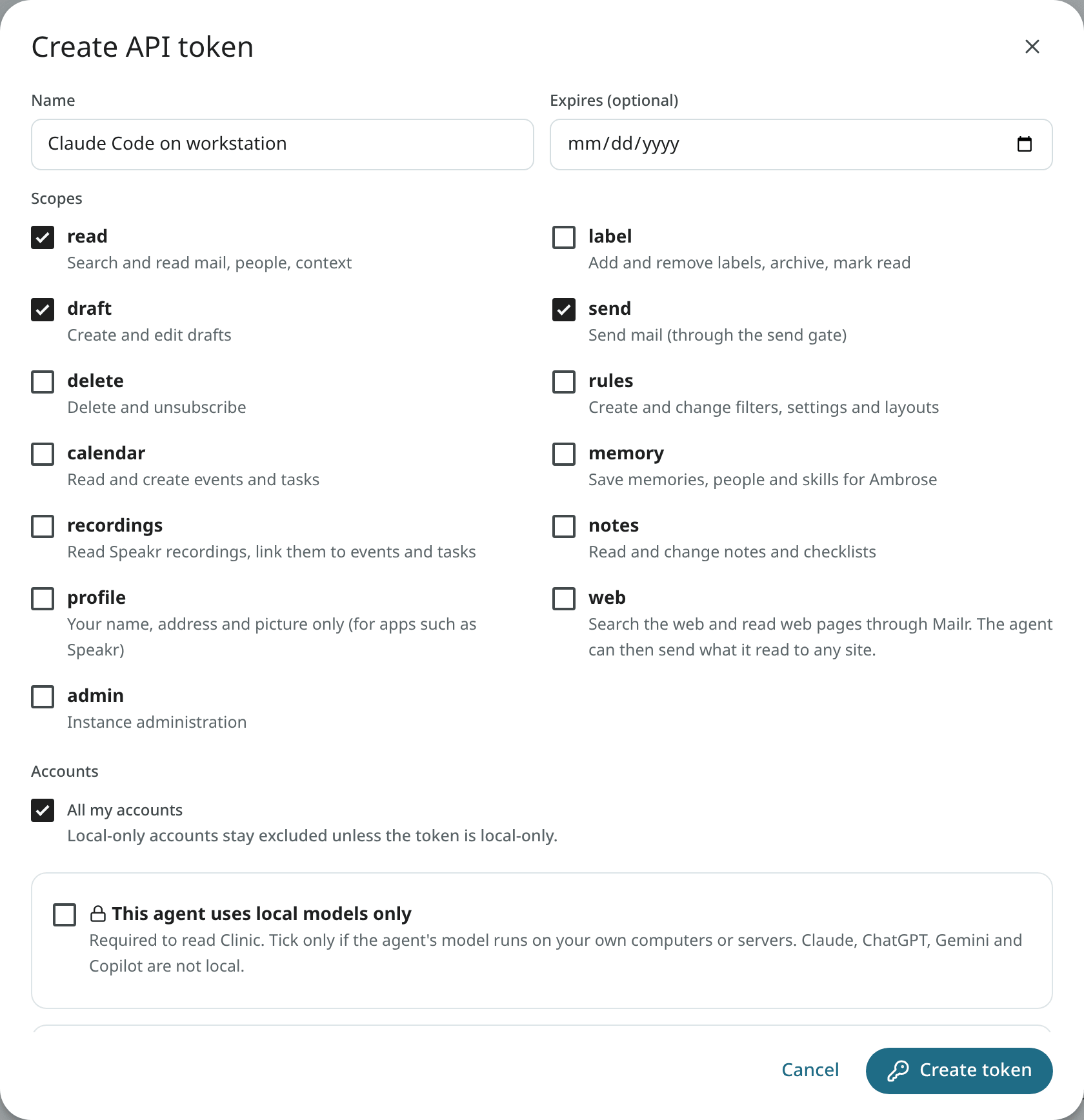
- Open Settings → Agents & API and click Create token under API tokens.
- Give it a Name for where it runs, for example "Claude Code on workstation".
- Optionally set Expires. The token expires at the end of that day.
- Tick the required Scopes. Start small:
readanddraftcover research and writing. - Choose the Accounts it may see, or keep All my accounts.
- If you have a local-only account, tick This agent uses local models only only when the agent's model runs on your own computers or servers. Claude, ChatGPT, Gemini and Copilot are not local.
- With the
sendscope, choose a send policy (see below). - Click Create token and copy the token. It is shown only once.
Tokens start with mlr_. Send one in the Authorization header:
Scopes
| Scope | Permitted actions |
|---|---|
read |
Search and read mail, people and context. |
label |
Add and remove labels, archive, mark read, star, snooze. |
draft |
Create and edit drafts. |
send |
Send mail, answer invitations, mail event guests and unsubscribe, through the send gate. |
delete |
Delete forever. |
rules |
Create and change filters, settings and layouts. |
calendar |
Read and create events and tasks. |
memory |
Save memories, people and skills for Ambrose. |
recordings |
Read Speakr recordings and link them to events and tasks. |
notes |
Read and change notes, checklists and tables. Text from a token is written into a note or a table only after approval, unless a rule allows it. Local-only notes are hidden from a token that is not local-only. |
profile |
Only your name, address and account picture (GET /api/v1/me, GET /api/v1/users/me/avatar). Intended for apps such as Speakr, in which the account picture is shown. |
web |
Search the web and read web pages through Mailr (web_search, read_page). The agent picks its own pages, so it can also send what it read to any site in a page address. A new token has this scope only when it is ticked. |
admin |
Only for an admin's older certificate tokens. Instance administration needs a signed-in admin and is refused for every token. |
tls |
Install the mail server's TLS certificate. Only for an admin's token, created on the command line (see Mail server). |
A scope is the outer limit. Inside it, each action is allowed, held for approval or denied according to the permission rules.
Accounts and local-only tokens
A token can be limited to some of the user's mail accounts. Mail from other accounts is left out of the token's searches, reads, drafts, calendars and summaries.
An account marked local-only stays hidden from every token that is not local-only, even with All my accounts. Its mail can be read with a local-only token. Give that flag only to an agent whose model runs on your own computers or servers, because an agent sends whatever it reads to its model. Whether a model is local cannot be checked in Mailr. Claude, ChatGPT, Gemini and Copilot run on their makers' servers, so they are not local.
The box is shown only when a local-only account exists. Accounts are marked local-only by their owner, under Settings → Mail → Mail accounts; administrators cannot see or set this mark.
Permission to mark agents local-only is set by the administrator (the access-policy switch Mark agents as local-only). Without that permission, a short note is shown in the dialog instead of the box. If the switch is turned off later, existing local-only tokens still work, but local-only accounts can no longer be read with them, and the token list shows local only (off).
Administrators can see the names of local-only tokens and when they were created and last used. No mail is shown through this list.
Text Ambrose wrote about the user's mail is also never given to a token limited to some accounts, or to one that is not local-only. This text includes briefs, the results of standing orders and routines, and the reasons behind smart labels. Such a token cannot be used to create or change standing orders either, because an order is run over all of the user's mail.
Model use
Requests of a token that involve a model call (Ambrose's chat, Help me write, summaries, translations, search by meaning, order tests) are limited per token: 20 a minute and 300 an hour by default (MAILR_TOKEN_MODEL_CALLS_PER_MINUTE, MAILR_TOKEN_MODEL_CALLS_PER_HOUR). Past a limit, HTTP 429 is returned. Use in Mailr itself is not limited.
Send policy
With the send scope, choose how sends work:
- Every message waits for my approval (recommended). Each send is held for approval.
- Send automatically within a policy. Sends inside the policy are sent after the hold time. Sends outside the policy are held for approval. A policy can require:
- Only replies inside an existing conversation;
- Only to people I have emailed before;
- Only to these domains, for example
example.com, partner.example; - a Max per hour and Max per day.
The first message to a new address is always held for approval, under any policy.
Create a token from the command line
An admin can create a token on the server:
docker compose exec app mailr create-token alex@northwind.example --name "nightly script" --scopes read,draft
Add --local-only for a local-only token. The flag has effect only while local-only agents are allowed by the user's policy. The command prints the token once. Without --scopes, the token is given read and draft.
Revoke a token
Click the revoke button next to a token under API tokens and confirm with Revoke. Agents using it are cut off at once.
All of a user's tokens are revoked when the password is changed or reset by an administrator. New tokens must be created afterwards.
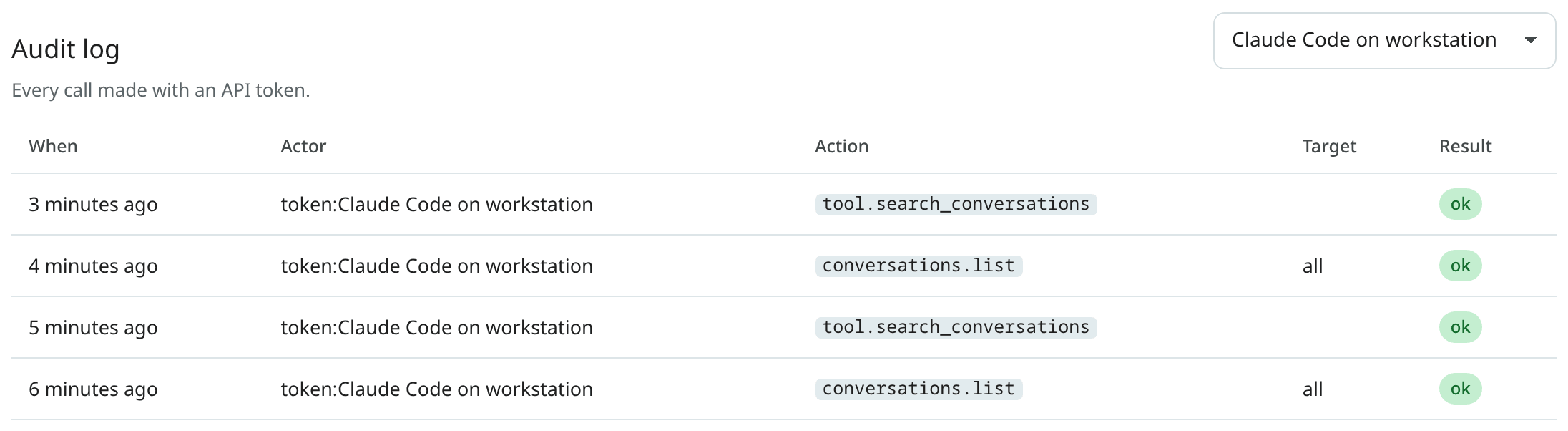
The audit log
Every call made with a token is listed under Settings → Agents & API → Audit log, with the time, the token, the action, its inputs and the result. You can filter the log by token. Calls by the built-in assistant are listed there too.