API Reference
Speakr provides a comprehensive REST API (v1) for automation tools, dashboard widgets, and custom integrations. This reference documents all available endpoints.
Interactive Documentation
Access the interactive Swagger UI documentation at /api/v1/docs on your Speakr instance. You can test endpoints directly from your browser.
Base URL
All API v1 endpoints are prefixed with /api/v1:
Authentication
All endpoints require authentication. See API Tokens for details on creating and managing tokens.
OpenAPI Specification
| Endpoint | Description |
|---|---|
GET /api/v1/docs | Interactive Swagger UI |
GET /api/v1/openapi.json | OpenAPI 3.0 specification |
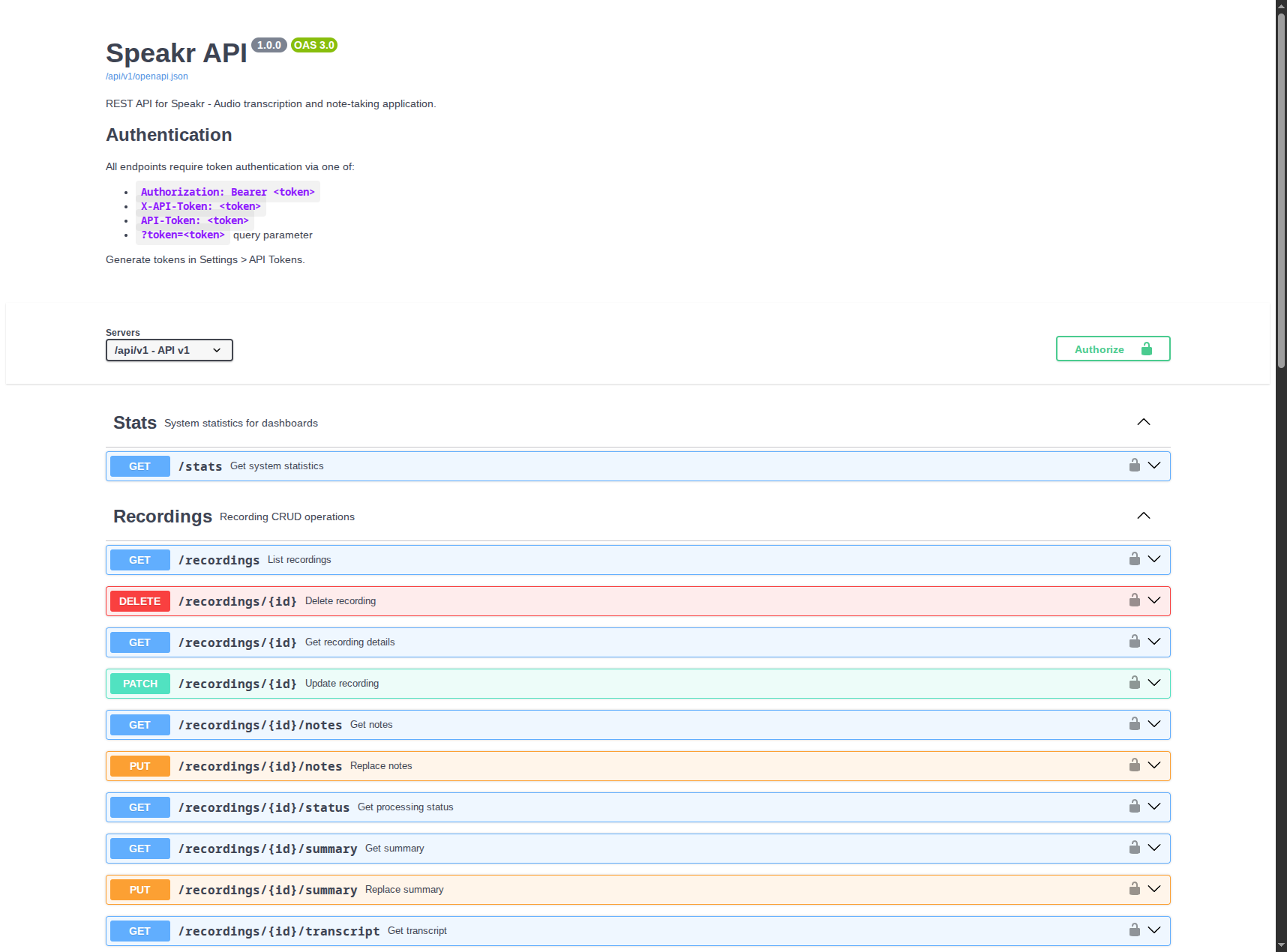
Interactive API documentation with Swagger UI at /api/v1/docs
Stats
Dashboard-compatible statistics endpoint, designed for integration with homepage widgets like gethomepage.dev.
Get Statistics
Query Parameters:
| Parameter | Type | Default | Description |
|---|---|---|---|
scope | string | user | user for personal stats, all for global (admin only) |
Response:
{
  "recordings": {
    "total": 150,
    "completed": 120,
    "processing": 5,
    "pending": 20,
    "failed": 5
  },
  "storage": {
    "used_bytes": 5368709120,
    "used_human": "5.0 GB"
  },
  "queue": {
    "jobs_queued": 3,
    "jobs_processing": 1
  },
  "tokens": {
    "used_this_month": 450000,
    "budget": 1000000,
    "percentage": 45.0
  },
  "transcription": {
    "used_this_month_seconds": 3600,
    "used_this_month_minutes": 60,
    "budget_seconds": 36000,
    "budget_minutes": 600,
    "percentage": 10.0,
    "estimated_cost": 0.36
  },
  "activity": {
    "recordings_today": 3,
    "last_transcription": "2024-01-15T14:30:00Z"
  }
}
gethomepage.dev Widget Configuration
- Speakr:
    widget:
      type: customapi
      url: https://speakr.example.com/api/v1/stats
      headers:
        Authorization: Bearer YOUR_TOKEN
      mappings:
        - field: recordings.completed
          label: Completed
        - field: storage.used_human
          label: Storage
        - field: tokens.percentage
          label: Token Usage
          format: percent
        - field: transcription.percentage
          label: Transcription
          format: percent
        - field: activity.recordings_today
          label: Today
Current User
Get Current User
Returns the authenticated user's profile, preferences, and group memberships. Useful for companion apps and automation flows that need to display the current user's identity.
Response:
{
  "id": 42,
  "username": "alice",
  "email": "alice@example.com",
  "name": "Alice Johnson",
  "job_title": "Product Manager",
  "company": "Acme Inc",
  "is_admin": false,
  "email_verified": true,
  "sso_provider": null,
  "can_share_publicly": true,
  "preferences": {
    "ui_language": "en",
    "transcription_language": "en",
    "output_language": "en",
    "extract_events": true,
    "auto_speaker_labelling": true,
    "auto_speaker_labelling_threshold": 0.75,
    "auto_summarization": true,
    "show_timestamps_simple_view": false,
    "editor_autosave": true,
    "diarize": true
  },
  "group_memberships": [
    {
      "group_id": 3,
      "group_name": "Engineering",
      "role": "admin",
      "joined_at": "2024-01-10T08:00:00Z"
    }
  ]
}
Recordings
Upload Recording
Upload a recording as multipart form-data and immediately queue transcription.
Form Fields:
| Field | Type | Required | Description |
|---|---|---|---|
file | file | yes | Audio file to upload |
notes | string | no | Optional notes |
file_last_modified | string | no | Client file lastModified (ms epoch) |
language | string | no | Language hint (ISO 639-1) |
min_speakers | integer | no | Min speaker count |
max_speakers | integer | no | Max speaker count |
tag_ids[0], tag_ids[1], ... | integer | no | Tag IDs (multi) |
tag_id | integer | no | Single tag ID (legacy) |
keep_audio_only | boolean | no | If true, the server discards the video stream and stores only the extracted audio. Lets you upload videos larger than max_file_size_mb, up to max_audio_only_video_size_mb, as long as the extracted audio fits the regular limit. When VIDEO_RETENTION is off at the server, this is implicit for video uploads. |
Response:
// 202 Accepted
{
  "id": 123,
  "title": "Recording - meeting.mp3",
  "status": "PENDING",
  "created_at": "2024-01-15T10:00:00Z",
  "meeting_date": "2024-01-15T09:00:00Z",
  "file_size": 15728640,
  "original_filename": "meeting.mp3",
  "mime_type": "audio/mpeg",
  "notes": "Quick test upload"
}
Example:
curl -X POST \
  -H "X-API-Token: YOUR_TOKEN" \
  -F "file=@/path/to/audio.mp3" \
  -F "notes=Quick test upload" \
  -F "language=en" \
  https://speakr.example.com/api/v1/recordings/upload
ASR Voice Recorder Upload
This adapter accepts the multipart webhook format sent by the Android ASR Voice Recorder app and queues the completed recording through Speakr's normal upload and transcription pipeline. Unlike other API endpoints, authentication comes from the required multipart secret field because the recorder cannot set a custom Authorization header.
Form Fields:
| Field | Type | Required | Description |
|---|---|---|---|
file | file | for uploads | Completed audio recording; omitted by ASR's connection test |
secret | string | yes | A personal Speakr API token |
file_name | string | no | Original filename override; sanitized by Speakr |
date | integer | no | Recording time as Unix epoch seconds or milliseconds |
duration | number | no | Accepted for compatibility but ignored; Speakr measures duration from the media |
note | string | no | Stored as the recording's notes |
A session cookie or normal API Authorization header does not replace secret on this endpoint. Create a dedicated, expiring token for the recorder because Speakr API tokens currently provide full access to their owner's account. The endpoint limits each source IP by both request count and total declared upload size; HTTP 429 means ASR should retry later. Multi-worker deployments using Flask-Limiter's in-memory storage should also enforce an aggregate upload rate at the reverse proxy.
When saving the webhook destination, ASR first sends an authenticated connection test without a file or recording metadata. Speakr returns HTTP 200 with {"status":"ok","connection_test":true} and does not create a recording. Completed deliveries still require the file field.
Response:
// 200 OK
{
  "id": 123,
  "title": "Recording - interview.m4a",
  "status": "PENDING",
  "original_filename": "interview.m4a",
  "notes": "Interview recorded with an external microphone",
  "idempotent_replay": false
}
If ASR retries the same completed file with matching filename, note, and recording date for the same user, Speakr returns the existing recording with idempotent_replay: true instead of queueing another transcription. Identical audio submitted with different metadata remains a distinct recording. Simultaneous first deliveries are not a strict exactly-once guarantee.
ASR Voice Recorder configuration:
- Webhook URL:
https://speakr.example.com/api/v1/integrations/asr-voice-recorder/upload - Secret: the dedicated Speakr API token
- Method/body: ASR supplies the multipart POST automatically
- Expected success status: HTTP 200
A manual protocol check can be made with placeholder credentials:
curl -X POST \
  -F "secret=YOUR_DEDICATED_TOKEN" \
  -F "file=@recording.m4a" \
  -F "file_name=recording.m4a" \
  -F "note=Mobile recorder upload" \
  https://speakr.example.com/api/v1/integrations/asr-voice-recorder/upload
List Recordings
Query Parameters:
| Parameter | Type | Default | Description |
|---|---|---|---|
page | integer | 1 | Page number |
per_page | integer | 25 | Items per page (max: 100) |
status | string | all | Filter: all, pending, processing, completed, failed |
sort_by | string | created_at | Sort field: created_at, meeting_date, title, file_size |
sort_order | string | desc | Sort order: asc, desc |
date_from | string | - | Filter from date (ISO format) |
date_to | string | - | Filter to date (ISO format) |
tag_id | integer | - | Filter by tag ID |
q | string | - | Search query (title, participants) |
inbox | boolean | - | Filter by inbox status |
starred | boolean | - | Filter by starred status |
folder_id | string | - | Filter by folder. Pass an integer folder ID to list recordings in that folder, or the literal none to list recordings not in any folder. Requires folders to be enabled. |
Response:
{
  "recordings": [
    {
      "id": 123,
      "title": "Team Meeting",
      "status": "COMPLETED",
      "created_at": "2024-01-15T10:00:00Z",
      "completed_at": "2024-01-15T10:05:00Z",
      "meeting_date": "2024-01-15T09:00:00Z",
      "file_size": 15728640,
      "original_filename": "meeting.mp3",
      "participants": "Alice, Bob",
      "is_inbox": false,
      "is_highlighted": true,
      "audio_available": true,
      "audio_duration": 1830.5,
      "has_transcription": true,
      "has_summary": true,
      "processing_time_seconds": 45.2,
      "transcription_duration_seconds": 38.1,
      "summarization_duration_seconds": 7.1,
      "folder_id": 5,
      "folder": {"id": 5, "name": "Client Calls"},
      "deletion_exempt": false,
      "error_message": null,
      "keep_audio_only": false,
      "tags": [
        {"id": 1, "name": "Work", "color": "#3B82F6"}
      ]
    }
  ],
  "pagination": {
    "page": 1,
    "per_page": 25,
    "total": 150,
    "total_pages": 6,
    "has_next": true,
    "has_prev": false
  }
}
Get Recording Details
Query Parameters:
| Parameter | Type | Default | Description |
|---|---|---|---|
format | string | full | full or minimal (excludes large text fields) |
include | string | transcription,summary,notes | Comma-separated fields to include |
Response:
{
  "id": 123,
  "title": "Team Meeting",
  "status": "COMPLETED",
  "participants": "Alice, Bob",
  "created_at": "2024-01-15T10:00:00Z",
  "meeting_date": "2024-01-15T09:00:00Z",
  "completed_at": "2024-01-15T10:05:00Z",
  "file_size": 15728640,
  "original_filename": "meeting.mp3",
  "mime_type": "audio/mpeg",
  "is_inbox": false,
  "is_highlighted": true,
  "audio_available": true,
  "audio_duration": 1830.5,
  "processing_time_seconds": 45.2,
  "transcription_duration_seconds": 38.1,
  "summarization_duration_seconds": 7.1,
  "folder_id": 5,
  "folder": {"id": 5, "name": "Client Calls"},
  "deletion_exempt": false,
  "events": [
    {
      "id": 1,
      "title": "Follow-up Meeting",
      "start_datetime": "2024-01-22T10:00:00Z",
      "end_datetime": "2024-01-22T11:00:00Z",
      "description": "Discuss project progress",
      "location": "Conference Room A"
    }
  ],
  "error_message": null,
  "duplicate_info": null,
  "keep_audio_only": false,
  "transcription": "Alice: Hello everyone...",
  "summary": "## Meeting Summary\n- Key point 1...",
  "notes": "Personal notes..."
}
Field notes
audio_duration is in seconds. The *_duration_seconds fields report how long each processing stage took. events is only populated when calendar-event extraction is enabled. error_message is non-null only when status is FAILED. folder / folder_id are populated when folders are enabled and the recording is assigned to one.
Transcript Formatting
The transcription field is automatically formatted using your default transcript template. Configure templates in Account Settings → Transcript Templates.
Get Transcript
Query Parameters:
| Parameter | Type | Default | Description |
|---|---|---|---|
format | string | json | Output format: json, text, srt, vtt |
Uses your default transcript template:
Get Summary
Response:
Get Notes
Response:
Get Processing Status
Response:
{
  "id": 123,
  "status": "PROCESSING",
  "queue_position": 2,
  "error_message": null,
  "completed_at": null
}
Status Values:
| Status | Description |
|---|---|
PENDING | Waiting in queue |
PROCESSING | Transcription in progress |
SUMMARIZING | Summary generation in progress |
COMPLETED | Processing finished successfully |
FAILED | Processing failed (check error_message) |
Update Recording
Request Body:
{
  "title": "Updated Title",
  "participants": "Alice, Bob, Charlie",
  "notes": "Updated notes...",
  "summary": "Updated summary...",
  "meeting_date": "2024-01-15T09:00:00Z",
  "is_inbox": false,
  "is_highlighted": true,
  "folder_id": 5
}
All fields are optional. Set folder_id to an integer to move the recording into that folder (you must have access to the target folder), or to null to remove it from any folder. folder_id requires folders to be enabled.
Replace Notes
Request Body:
Replace Summary
Request Body:
Delete Recording
Response:
Tags
List Tags
Returns both personal tags and group tags you have access to.
Response:
{
  "tags": [
    {
      "id": 1,
      "name": "Work Meetings",
      "color": "#3B82F6",
      "is_group_tag": false,
      "group_id": null,
      "custom_prompt": "Focus on action items...",
      "default_language": "en",
      "default_min_speakers": 2,
      "default_max_speakers": 10,
      "protect_from_deletion": false,
      "can_edit": true
    }
  ]
}
Create Tag
Request Body:
{
  "name": "Interviews",
  "color": "#10B981",
  "custom_prompt": "Extract candidate qualifications...",
  "default_language": "en",
  "default_min_speakers": 2,
  "default_max_speakers": 3,
  "group_id": null
}
Update Tag
Request Body:
Delete Tag
Add Tags to Recording
Request Body:
Remove Tag from Recording
Speakers
List Speakers
Response:
{
  "speakers": [
    {
      "id": 1,
      "name": "John Doe",
      "use_count": 45,
      "last_used": "2024-01-15T14:30:00Z",
      "confidence_score": 0.87,
      "has_voice_profile": true
    }
  ]
}
Create Speaker
Request Body:
Update Speaker
Updates the speaker name and cascades changes to all recordings.
Request Body:
Delete Speaker
Get Recording Speakers
Returns speakers in the recording with voice-based identification suggestions.
Response:
{
  "speakers": [
    {
      "label": "SPEAKER_00",
      "identified_name": "John Doe",
      "speaker_id": 1,
      "segment_count": 23
    }
  ],
  "suggestions": {
    "SPEAKER_01": [
      {"speaker_id": 2, "name": "Jane Smith", "similarity": 89.5}
    ]
  }
}
Processing Operations
Queue Transcription
Request Body:
{
  "language": "en",
  "min_speakers": 1,
  "max_speakers": 5,
  "hotwords": "Speakr, WhisperX, diarization",
  "initial_prompt": "Technical discussion about audio transcription.",
  "transcription_model": "gpt-4o-transcribe-diarize"
}
All parameters are optional.
| Parameter | Type | Description |
|---|---|---|
language | string | Language hint (ISO 639-1). Empty string forces auto-detect. |
min_speakers | integer | Minimum speaker count for diarization. |
max_speakers | integer | Maximum speaker count for diarization. |
hotwords | string | Word-biasing hint. Connectors that accept biasing route this to their native parameter (WhisperX hotwords, Mistral context bias, OpenAI prompt). Connectors that ignore it drop it silently. |
initial_prompt | string | Free-text context hint. Same per-connector behavior as hotwords. |
transcription_model | string | Per-request model override. Validated against the admin-curated visible-models list; falls back to the configured default if absent or invalid. Use GET /api/v1/transcription to discover valid values. |
Response:
Queue Summarization
Request Body:
The custom prompt overrides the recording's tag prompts and user defaults.
Chat
Chat with Recording
Ask questions about a recording's content using AI.
Request Body:
{
  "message": "What were the main action items discussed?",
  "conversation_history": [
    {"role": "user", "content": "Who attended?"},
    {"role": "assistant", "content": "John and Jane attended..."}
  ]
}
Response:
{
  "response": "The main action items were:\n1. Complete the report by Friday\n2. Schedule follow-up meeting...",
  "sources": []
}
Events
Get Calendar Events
Returns calendar events extracted from the recording.
Response:
{
  "events": [
    {
      "id": 1,
      "title": "Follow-up Meeting",
      "start_datetime": "2024-01-22T10:00:00Z",
      "end_datetime": "2024-01-22T11:00:00Z",
      "description": "Discuss project progress",
      "location": "Conference Room A"
    }
  ]
}
Download Events as ICS
Returns an ICS file containing all events from the recording.
Audio
Download Audio
Query Parameters:
| Parameter | Type | Default | Description |
|---|---|---|---|
download | boolean | false | true to force download, false to stream |
Batch Operations
Batch Update Recordings
Request Body:
{
  "recording_ids": [1, 2, 3],
  "updates": {
    "is_inbox": false,
    "is_highlighted": true,
    "add_tag_ids": [5],
    "remove_tag_ids": [2],
    "folder_id": 5
  }
}
Supported updates fields: is_inbox, is_highlighted, add_tag_ids, remove_tag_ids, and folder_id (move all selected recordings into that folder, or null to remove them from their folders; you must have access to the target folder, and folders must be enabled). A 403 is returned if you lack access to the target folder, and 404 if it does not exist.
Response:
{
  "success": true,
  "updated": 3,
  "failed": 0,
  "results": [
    {"id": 1, "success": true},
    {"id": 2, "success": true},
    {"id": 3, "success": true}
  ]
}
Batch Delete Recordings
Request Body:
Batch Queue Transcriptions
Request Body:
Folders
Folders organize recordings into a one-to-many structure (a recording belongs to at most one folder).
Folders must be enabled
The folders feature is off by default. An administrator must enable it under System Settings → enable_folders. While disabled, GET /api/v1/folders returns an empty list and the create/update/delete endpoints return 403 {"error": "Folders feature is not enabled"}.
Folders can be personal or group-scoped. Personal folders are editable only by their owner. Group folders are visible to all members of the group but editable only by group admins. Each folder's to_dict() includes a can_edit flag indicating whether the calling user may modify it.
List Folders
Returns personal folders plus any group folders you have access to.
Response:
[
  {
    "id": 5,
    "name": "Client Calls",
    "color": "#10B981",
    "group_id": null,
    "is_group_folder": false,
    "group_name": null,
    "custom_prompt": "Focus on action items...",
    "default_language": "en",
    "default_min_speakers": 2,
    "default_max_speakers": 5,
    "default_hotwords": null,
    "default_initial_prompt": null,
    "default_transcription_model": null,
    "protect_from_deletion": false,
    "retention_days": null,
    "auto_share_on_apply": true,
    "share_with_group_lead": true,
    "naming_template_id": null,
    "naming_template_name": null,
    "export_template_id": null,
    "export_template_name": null,
    "created_at": "2024-01-10T08:00:00Z",
    "recording_count": 12,
    "can_edit": true,
    "user_role": null
  }
]
Get Folder
Returns a single folder. You must own a personal folder, or be a member of the group for a group folder. The response is the folder object above (with can_edit).
Create Folder
Request Body:
{
  "name": "Client Calls",
  "color": "#10B981",
  "group_id": null,
  "custom_prompt": "Focus on action items...",
  "default_language": "en",
  "default_min_speakers": 2,
  "default_max_speakers": 5,
  "default_hotwords": "Acme, Speakr",
  "default_initial_prompt": "Sales call.",
  "default_transcription_model": "gpt-4o-transcribe-diarize",
  "retention_days": null
}
Only name is required. Set group_id to create a group folder (you must be an admin of that group). Use retention_days: -1 to mark the folder as protected from auto-deletion (only effective when auto-deletion is enabled at the server). Returns the created folder with 201.
Update Folder
Accepts the same fields as create; all are optional. Only the folder owner (personal) or a group admin (group folder) may update. Returns the updated folder.
Delete Folder
Recordings in the deleted folder are unassigned (their folder_id becomes null); they are not deleted. Only the folder owner (personal) or a group admin (group folder) may delete.
Response:
Assigning recordings to folders
To move a recording into or out of a folder, set folder_id on PATCH /api/v1/recordings/{id} or in the updates object of batch update. To list a folder's recordings, use GET /api/v1/recordings?folder_id={id} (or folder_id=none for unfiled recordings).
Transcription Connector
Discover Active Connector
Returns the active transcription connector, the optional fields it accepts, the admin-curated list of selectable models, and the configured default model. Use this to drive client UIs and to know which values are valid for the transcription_model override on /recordings/{id}/transcribe and /recordings/upload.
Response:
{
  "connector": "openai_transcribe",
  "capabilities": {
    "diarization": true,
    "speaker_count_control": false,
    "hotwords": true,
    "initial_prompt": true,
    "timestamps": true,
    "language_detection": true,
    "chunking": false
  },
  "models": [
    {"value": "gpt-4o-transcribe-diarize", "label": "GPT-4o Diarize"}
  ],
  "default_model": "gpt-4o-transcribe-diarize"
}
connector may be null when the legacy transcription architecture is in use. The capabilities flags indicate which optional request fields (hotwords, initial_prompt, speaker-count controls) the active connector honors; connectors that do not support a field drop it silently.
Webhooks
Webhooks deliver event notifications to an external URL when things happen to your recordings. Each webhook is owned by the user who creates it. The number of webhooks per user is capped (default 10, configurable by the administrator via WEBHOOK_MAX_PER_USER).
Delivery security and reliability
Each delivery is signed with an HMAC-SHA256 signature sent in the Speakr-Signature header (formatted as sha256=<hex>), computed over the raw request body using the webhook's secret. Deliveries also carry Speakr-Delivery-Id (a UUID for idempotency), Speakr-Event (the event type), and Speakr-Timestamp headers. Failed deliveries are retried automatically; after a configurable number of consecutive failures (WEBHOOK_AUTOPAUSE_FAILURES, default 10) the webhook is auto-paused (auto_paused: true, enabled: false). Re-enabling it manually clears the auto-pause flag.
For administrator-level configuration and receiver setup, see the Webhooks admin guide.
Event Types
These are the event types a webhook can subscribe to:
| Event | Fired when |
|---|---|
recording.created | A recording is created |
recording.transcription.started | Transcription begins |
recording.transcription.completed | Transcription finishes successfully |
recording.transcription.failed | Transcription fails |
recording.summary.completed | Summary generation finishes |
recording.summary.failed | Summary generation fails |
recording.events.extracted | Calendar events are extracted |
recording.updated | A recording is updated |
recording.deleted | A recording is deleted |
webhook.test | A manual test delivery (see Test Webhook below) |
List Webhooks
Response:
{
  "webhooks": [
    {
      "id": 1,
      "user_id": 42,
      "name": "n8n pipeline",
      "url": "https://hooks.example.com/speakr",
      "allow_http": false,
      "events": ["recording.transcription.completed", "recording.summary.completed"],
      "enabled": true,
      "auto_paused": false,
      "consecutive_failures": 0,
      "created_at": "2024-01-15T10:00:00Z",
      "updated_at": "2024-01-15T10:00:00Z",
      "last_delivery_at": "2024-01-16T09:30:00Z"
    }
  ],
  "event_types": [
    "recording.created",
    "recording.transcription.started",
    "recording.transcription.completed",
    "recording.transcription.failed",
    "recording.summary.completed",
    "recording.summary.failed",
    "recording.events.extracted",
    "recording.updated",
    "recording.deleted",
    "webhook.test"
  ],
  "max_per_user": 10
}
The webhook's HMAC secret is never returned by this endpoint. It is shown only once, in the create and rotate-secret responses.
Create Webhook
Request Body:
{
  "name": "n8n pipeline",
  "url": "https://hooks.example.com/speakr",
  "events": ["recording.transcription.completed"],
  "allow_http": false,
  "enabled": true
}
name, url, and a non-empty events array are required; every event must be a known event type. allow_http (default false) must be true for http:// URLs. The URL is validated against an SSRF guard. Exceeding the per-user cap returns 409.
Response (201): the webhook object, including the secret field once:
{
  "id": 1,
  "user_id": 42,
  "name": "n8n pipeline",
  "url": "https://hooks.example.com/speakr",
  "allow_http": false,
  "events": ["recording.transcription.completed"],
  "enabled": true,
  "auto_paused": false,
  "consecutive_failures": 0,
  "created_at": "2024-01-15T10:00:00Z",
  "updated_at": "2024-01-15T10:00:00Z",
  "last_delivery_at": null,
  "secret": "xK9...copy-me-now..."
}
Get Webhook
Returns the webhook object (without the secret).
Update Webhook
Request Body (all fields optional):
{
  "name": "Updated name",
  "url": "https://hooks.example.com/v2",
  "events": ["recording.transcription.completed", "recording.deleted"],
  "allow_http": false,
  "enabled": true
}
When provided, events must be a non-empty array of known event types. Setting enabled: true also clears the auto_paused flag. Returns the updated webhook.
Delete Webhook
Returns 204 No Content.
Rotate Secret
Generates a fresh HMAC secret and returns the webhook object with the new secret included once. Existing deliveries already signed with the old secret are not re-signed.
Test Webhook
Enqueues a synthetic webhook.test delivery against this single webhook so you can verify reachability before subscribing to production events. The webhook must be enabled (otherwise 409).
Response (202): the created delivery object (see below).
List Deliveries
Query Parameters:
| Parameter | Type | Default | Description |
|---|---|---|---|
limit | integer | 50 | Max deliveries to return (1–200) |
Response:
{
  "deliveries": [
    {
      "id": 1001,
      "webhook_id": 1,
      "event_id": "550e8400-e29b-41d4-a716-446655440000",
      "event_type": "recording.transcription.completed",
      "attempt_count": 1,
      "status": "success",
      "response_status": 200,
      "response_body_preview": "{\"ok\":true}",
      "error_message": null,
      "next_retry_at": null,
      "created_at": "2024-01-16T09:30:00Z",
      "delivered_at": "2024-01-16T09:30:01Z"
    }
  ],
  "limit": 50
}
Delivery status is one of pending, success, failed (retryable), or permanent_failure (retries exhausted or non-retryable).
Get Delivery
Returns a single delivery. This response additionally includes the full serialized payload (the exact JSON body that was/will be POSTed) for debugging.
Replay Delivery
Re-enqueues the delivery as a brand-new attempt with the same payload (with a fresh event_id and timestamp, plus a replayed_from reference to the original). Returns the new delivery object with 202.
Error Responses
All endpoints return consistent error responses:
Common HTTP Status Codes:
| Code | Description |
|---|---|
200 | Success |
201 | Created |
400 | Bad Request - Invalid parameters |
401 | Unauthorized - Invalid or missing token |
403 | Forbidden - No permission for this resource |
404 | Not Found - Resource doesn't exist |
500 | Internal Server Error |
Rate Limits
API endpoints are rate-limited to prevent abuse:
| Endpoint Type | Limit |
|---|---|
| Stats | 60 requests/minute |
| GET endpoints | 100 requests/minute |
| PATCH/DELETE | 30 requests/minute |
| Processing operations | 10 requests/minute |
| Batch operations | 10 requests/minute |
Integration Examples
Python SDK Pattern
import requests

class SpeakrAPI:
    def __init__(self, base_url, token):
        self.base_url = base_url.rstrip('/')
        self.session = requests.Session()
        self.session.headers['Authorization'] = f'Bearer {token}'

    def get_stats(self):
        return self.session.get(f'{self.base_url}/api/v1/stats').json()

    def list_recordings(self, status='all', page=1):
        return self.session.get(
            f'{self.base_url}/api/v1/recordings',
            params={'status': status, 'page': page}
        ).json()

    def get_transcript(self, recording_id, format='text'):
        return self.session.get(
            f'{self.base_url}/api/v1/recordings/{recording_id}/transcript',
            params={'format': format}
        ).json()

# Usage
api = SpeakrAPI('https://speakr.example.com', 'YOUR_TOKEN')
stats = api.get_stats()
print(f"Total recordings: {stats['recordings']['total']}")
n8n Workflow
- Use HTTP Request node
- Set Method to
GET - Set URL to
https://your-instance/api/v1/recordings - In Authentication, select Header Auth
- Add header:
Authorization=Bearer YOUR_TOKEN
Zapier Integration
Use the Webhooks by Zapier app with:
- Trigger: Custom webhook
- Action: GET request to
/api/v1/recordings - Headers:
Authorization: Bearer YOUR_TOKEN
Next: Learn about API Tokens for authentication setup.